Experience the Thrill of Polygon Flight Simulator
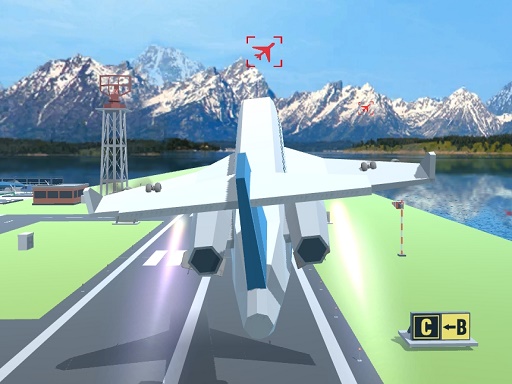
Take to the skies with a lightweight, browser-based flight experience that blends arcade action with smooth WebGL controls. Polygon Flight Simulator delivers fast-paced aerial challenges, intuitive handling, and a clean visual style that runs directly in your browser using Unity3D technology. Whether you are new to flying games or a seasoned pilot, this title offers an easy entry point and satisfying depth as you master the basics and push your skills further.
Polygon Flight Simulator is an action-focused flying game built with Unity3D and optimized for WebGL, making it accessible without downloads or installs. You pilot an aircraft through open environments, completing missions, exploring the skies, and testing your reflexes. The game emphasizes responsive controls, clear feedback, and a steady learning curve that keeps the experience engaging from the first takeoff to advanced maneuvers.
Because it runs in the browser, you can jump in quickly on most modern devices. The streamlined presentation keeps performance smooth while still delivering the excitement of aerial combat and exploration. The result is a pick-up-and-play flight sim that feels immediate and rewarding.
How the Controls Feel in the Air
From the moment you lift off, the controls are tuned for arcade-style responsiveness. Pitch, roll, and yaw respond with a natural weight that makes it easy to correct your path and line up targets. Acceleration and braking are straightforward, letting you focus on positioning rather than complex instrumentation. This design keeps the action flowing while still giving you room to refine your technique.
As you progress, you will notice subtle nuances in how the aircraft handles at different speeds and altitudes. Gentle adjustments keep you stable during long strafing runs, while sharper inputs enable quick turns and evasive maneuvers. The control scheme supports both relaxed cruising and intense dogfighting, so you can choose the pace that suits your mood.
Core Gameplay and Mission Variety
The core loop centers on taking off, navigating objectives, and returning safely while managing threats and fuel. Missions can include target practice, escort duties, and exploration challenges that test your ability to read the terrain and plan routes. Each run feels dynamic because enemy behavior, weather-like effects, and environmental obstacles keep you on your toes.
Progression is driven by skill rather than grind. Success comes from cleaner flight paths, better aim, and smarter use of altitude and speed. The game rewards consistency and creative problem solving, so you can experiment with different approaches to the same objective and find the style that fits you best.
Visual Style and Performance
Polygon Flight Simulator uses a clean, low-poly aesthetic that enhances readability and keeps performance high. The streamlined visuals make it easy to spot targets, track your heading, and appreciate the scale of the world around you. This art direction pairs well with the WebGL engine, delivering stable frame rates and quick load times.
Despite the minimalist look, the game still conveys a strong sense of speed and motion. Clouds, terrain, and structures provide visual anchors that help you orient yourself during fast passes and tight turns. The result is a polished presentation that supports gameplay first while remaining attractive and immersive.
Tips to Improve Your Flight Skills
Start by mastering level flight and gentle turns. Keeping your aircraft stable makes aiming easier and reduces wasted energy. Practice short bursts of acceleration to close gaps quickly, then ease off to maintain control during complex maneuvers. This rhythm helps you stay agile without overcorrecting.
Next, learn to use altitude to your advantage. Climbing gives you better visibility and more time to react, while diving adds speed for attack runs. Combine these vertical moves with horizontal dodges to create unpredictable flight paths that are harder for enemies to track. Over time, these habits will make your runs smoother and more efficient.
Why the Browser Experience Matters
WebGL technology lets you play instantly without waiting for downloads or updates. This convenience means you can fit a quick session into any part of your day, whether you have five minutes or an hour. The game loads fast and runs on a wide range of systems, making it ideal for both desktop and laptop play.
Because it is browser-based, you also get consistent access to your progress. There is no need to manage installs or worry about storage space. Just open the page and fly. This approach keeps the focus on fun and removes friction from the experience.
Play Now
Ready to take off? Jump into the cockpit and start your engines with Polygon Flight Simulator. The skies are waiting, and every flight is a chance to improve your skills, complete new challenges, and enjoy the rush of arcade-style aerial action.
FAQ
Is Polygon Flight Simulator free to play? Yes, you can play it directly in your browser without payment or downloads. The WebGL build makes it easy to start instantly.
Do I need to create an account? Most browser play is available without registration, but check the site for any optional features that might require an account.
What devices are supported? The game is designed for modern browsers on desktop and laptop systems. For the best experience, use an up-to-date browser and a stable internet connection.
Can I play with a keyboard and mouse? Yes, the controls are optimized for keyboard and mouse input. This setup provides precise aiming and smooth flight adjustments.
How do I get better at the game? Focus on smooth inputs, learn to use altitude, and practice short, controlled bursts of speed. Replay missions to refine your routes and timing.
Does the game have different modes? The experience includes varied objectives and challenges that encourage different play styles, from exploration to combat-focused runs.