Thrilling Action in Grand Zombie Swarm 2
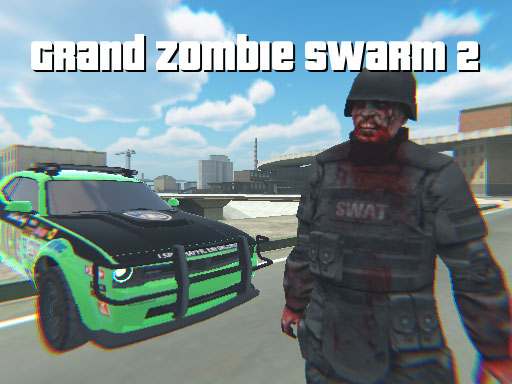
Dive into a world overrun by the undead where every second counts and every bullet matters. In this heart-pounding Unity3D shooter, you will take on hordes of zombies from a first-person perspective, combining fast-paced gunplay with the freedom of open-world driving. The experience is built for WebGL, ensuring smooth performance right in your browser, and it delivers an action-packed session whether you have five minutes or an hour to spare.
The game presents a gritty urban environment filled with decaying streets, abandoned vehicles, and lurking threats around every corner. Powered by Unity3D, the graphics strike a balance between detailed textures and fluid frame rates, which is essential for fast shooting sequences. Dynamic lighting casts eerie shadows that make night missions feel tense, while daytime drives reveal a sprawling cityscape ripe for exploration. Environmental details like shattered windows, graffiti-covered walls, and burning debris help ground the action and make each mission feel alive.
Camera work stays true to the first-person view, giving you a direct connection to the action. Weapon models are rendered with care, and muzzle flashes paired with shell casings add satisfying feedback to every shot. The world responds to your presence, with zombies reacting to sound and movement, which encourages tactical positioning and careful awareness of your surroundings.
Core Combat and Weapon Mechanics
Combat is built around responsive controls and impactful gunplay. You will find a variety of firearms that handle differently, from rapid-fire SMGs to hard-hitting shotguns and precise rifles. Each weapon features unique recoil patterns, reload times, and effective ranges, so selecting the right tool for the situation matters. Headshots deliver instant takedowns, while body shots chip away at enemy health, rewarding accuracy and composure under pressure.
Ammo management is a constant consideration, and switching between weapons keeps fights dynamic. Crosshair behavior, weapon sway, and audio cues are tuned to create an immersive rhythm of fire and movement. Whether you are holding a choke point or pushing through a tight alley, the combat loop remains engaging and skill-based.
Open-World Driving and Exploration
One of the standout features is the freedom to hop into vehicles and roam the city. Driving adds a strategic layer to survival, letting you reposition quickly, break line of sight, or ram through clusters of undead. Cars handle with a realistic weight that rewards careful steering and momentum control, and you can switch between on-foot combat and vehicular travel at almost any time.
Exploration pays off with useful cover spots, weapon caches, and vantage points that give you an edge in firefights. The map layout encourages lateral thinking: take the highway for speed or cut through side streets for stealthier approaches. With zombies drawn to engine noise, driving becomes a risk-versus-reward decision that keeps decision-making fresh.
Survival Strategies for Thriving in the Swarm
Survival is about more than reflexes; it is about planning and situational awareness. Keep moving to avoid being surrounded, and use vehicles to create distance when waves grow too dense. Prioritize headshots to conserve ammunition, and watch for audio cues that signal approaching groups. Doorways and corners are natural choke points where you can control the flow of enemies.
Resource awareness is key. Track your ammo and health, and do not hesitate to retreat and regroup if the tide turns. Consider alternate routes for extraction, and remember that higher ground often gives better sightlines for spotting threats early. Maintain a steady pace and avoid panic reloading; learning weapon swap timing can save precious seconds in tight moments.
How to Play and Browser Performance
Getting started is simple thanks to WebGL compatibility. You can jump straight into the action through your browser without downloads or installations. Controls are mapped intuitively for movement, aiming, shooting, and driving, and most input devices are well supported. Sensitivity settings can be adjusted to match your preference, which helps with precise aiming and smoother driving.
Performance is optimized for modern browsers, with scalable graphics options that keep gameplay fluid on a range of systems. If you experience stutters, lowering shadow quality or draw distance can help while maintaining visual clarity. For the best experience, use a stable internet connection and close background applications to free up system resources.
Ready to dive in? You can start playing right here: Grand Zombie Swarm 2.
What makes the first-person driving unique?
The seamless ability to switch between on-foot gunplay and vehicle control creates a distinct rhythm rarely seen in shooters. Driving lets you scout ahead, escape tight spots, and reposition for better angles, while first-person shooting keeps the action immediate and personal. The two systems complement each other, making city traversal as strategic as combat encounters.
FAQ
Is there a learning curve for new players? Yes, but it is approachable. The controls are straightforward, and early encounters give you time to learn movement, aiming, and driving. Practicing headshots and vehicle handling will quickly build confidence.
Can I play on different devices? Since the game uses WebGL, it runs directly in modern browsers on desktop platforms. For the best results, use an up-to-date browser and a device that can handle 3D rendering smoothly.
What should I focus on first? Start by mastering basic aiming and movement, then learn how vehicles handle. Once you are comfortable, experiment with weapon choices and routes through the city to refine your survival strategy.